Software · licensed per device MIKA Playback

One remote. Every player on the set.

A player on every screen in frame and one remote that finds them, grades them, previews them and cues them together. Built on set, for set.

MacWindowsLinuxApple TViPhoneAndroidiPad remoteCustom builds
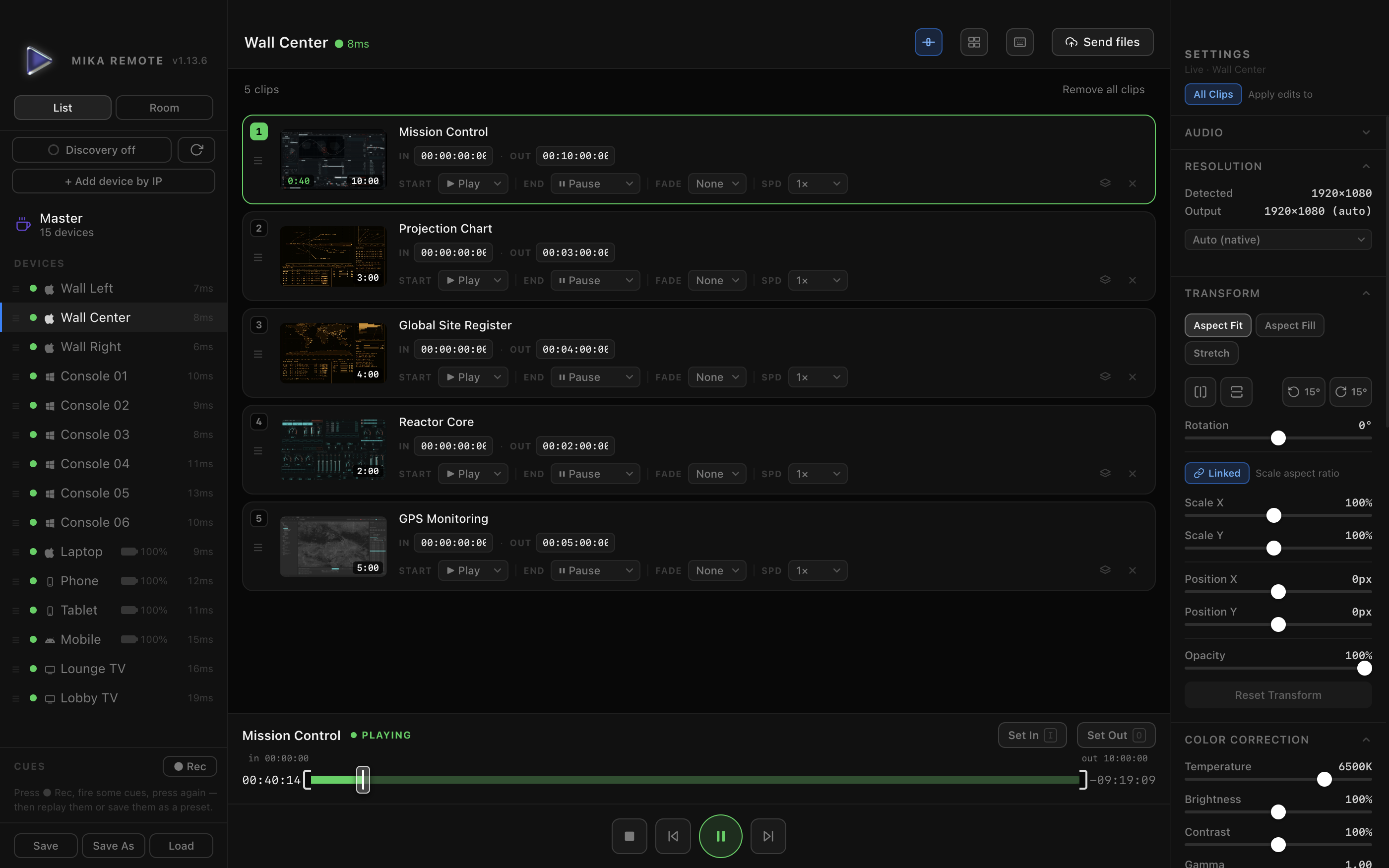
MIKA Remote with fifteen devices in the sidebar, one device selected and its clip list playing
01 · MIKA Remote

The whole set from one screen.

Open the Remote on the show laptop or an iPad. Every device running MIKA Player appears on its own, with its platform, battery and latency. Select one device, a group, or the whole set, and cue, grade, frame and preview from the chair.

Finds every device

Automatic discovery on the show network, a subnet sweep for the ones a firewall hides, manual IP for anything else.

Master, groups, devices

Fire one screen, a group, or the whole set. Grouped cues land within a couple of milliseconds of each other.

Live preview

A live tile for every device, streamed from the player itself. What is on the laptop is what is on the monitor in frame.

Room mode

Load a plan of the set and drop each screen where it stands. Pins carry the name, platform and latency, so the operator reads the room, not a list.

Color and transform

Temperature, brightness, contrast, gamma, saturation, aspect, scale, position and rotation on any screen, from the laptop, while the camera rolls.

Send files

Push a clip, an image or a custom build to any device or group. Every clip is conformed on arrival so it cues instantly.

Scale 1 to 100+ devicesDiscovery automaticFeedback live tilesNetwork offline, no internet
02 · MIKA Player

A fullscreen player for every screen in frame.

Laptops, monitors, TVs and mini PCs. Cue from the keyboard or from the Remote. It never shows a desktop, a cursor or a dialog.

Video, stills, overlays and custom builds

Drop in whatever the edit exports. Every clip is conformed once on receipt into a file that cues instantly. Alpha overlays and custom builds cue like any other clip.

In and out points, start and end actions

Trim on the live timeline, then loop, stop, or chain straight into the next clip. Cues can crossfade or cut.

Color and transform per clip

Match the screen to the lighting, then save it with the clip. Reset in one press.

VFX screen

Tracking markers, charts and grey wedges on a brightness-controlled background for the post team.

Controlled from the Remote

Every player answers the Remote: cue, grade, transform, live preview and file push, alone or as part of a group.

Fully offline

Clips are copied into the player. No internet, no drive letters, no missing media.

Platforms macOS · Windows · Linux · Apple TV · iPhone · AndroidMedia video · stills · alpha overlays · custom buildsCueing in / loop / out
03 · MIKA Phone

A real phone the actor holds.

An iPhone or Android phone running a screen-accurate phone that does what the script says. Calls come in, texts arrive, notifications land, on the operator's cue. Cued clips play with sound, and alerts vibrate.

Calls

Incoming and outgoing, locked or unlocked, with the timer and end state the scene needs.

Texts and threads

Scripted conversations with history, delivered one beat at a time, typed replies included.

Notifications

Lock-screen banners and stacks from any app, with the actor's own wallpaper, clock and status bar.

FaceTime that records

Simulated video calls with the actor's camera captured natively at an exact frame rate.

Set up on the phone itself

Contacts, threads, calls, notifications, wallpapers, clock and status bar are all built in the app by the operator. Most scenes never need a custom build.

Custom builds, and a player

A banking app, a tracking map, a dating profile, a surveillance feed: installed on the phone and controlled from the Remote. Clips cue on the phone like any other screen.

Platforms iOS · AndroidCued by hidden panel · Bluetooth keyboard · MIKA RemoteSound from cued clips · vibration for alerts
04 · Custom builds

When the script needs a screen that does not exist.

Dispatch consoles, surveillance walls, bank statements, live maps, dating apps, medical monitors. If it has a screen, it can be built. Every build is one self-contained file that plays in the Player or on the Phone, matched to your reference and cued beat by beat.

01

Most of it, in the app

Calls, texts, notifications, contacts, wallpapers, clips, overlays and grades are all set up by the operator inside MIKA. No build needed.

02

Anything else, built to order

Send a frame from the art department, a screenshot or a paragraph from the script. The screen comes back matched to the reference, readable on camera, with fictional names and 555 numbers throughout.

03

Cued like everything else

A build carries its own start state and steps through its beats from the Remote or the keyboard. Nothing for the operator to stage.

See screens built for camera
05 · Licensing

Request pricing.

MIKA is licensed per device and quoted for the time you need it. Tell us how many screens are in the show and when you shoot, and we come back with a quote and a test build.

Per device

Each player, phone and remote carries its own offline license key. No account, no internet on set.

For the time you need

Quoted per device for the days, weeks or run of show you need. Add screens or extend mid-shoot without a new agreement.

Support on the floor

A direct line during prep and shoot days, and custom builds on request.